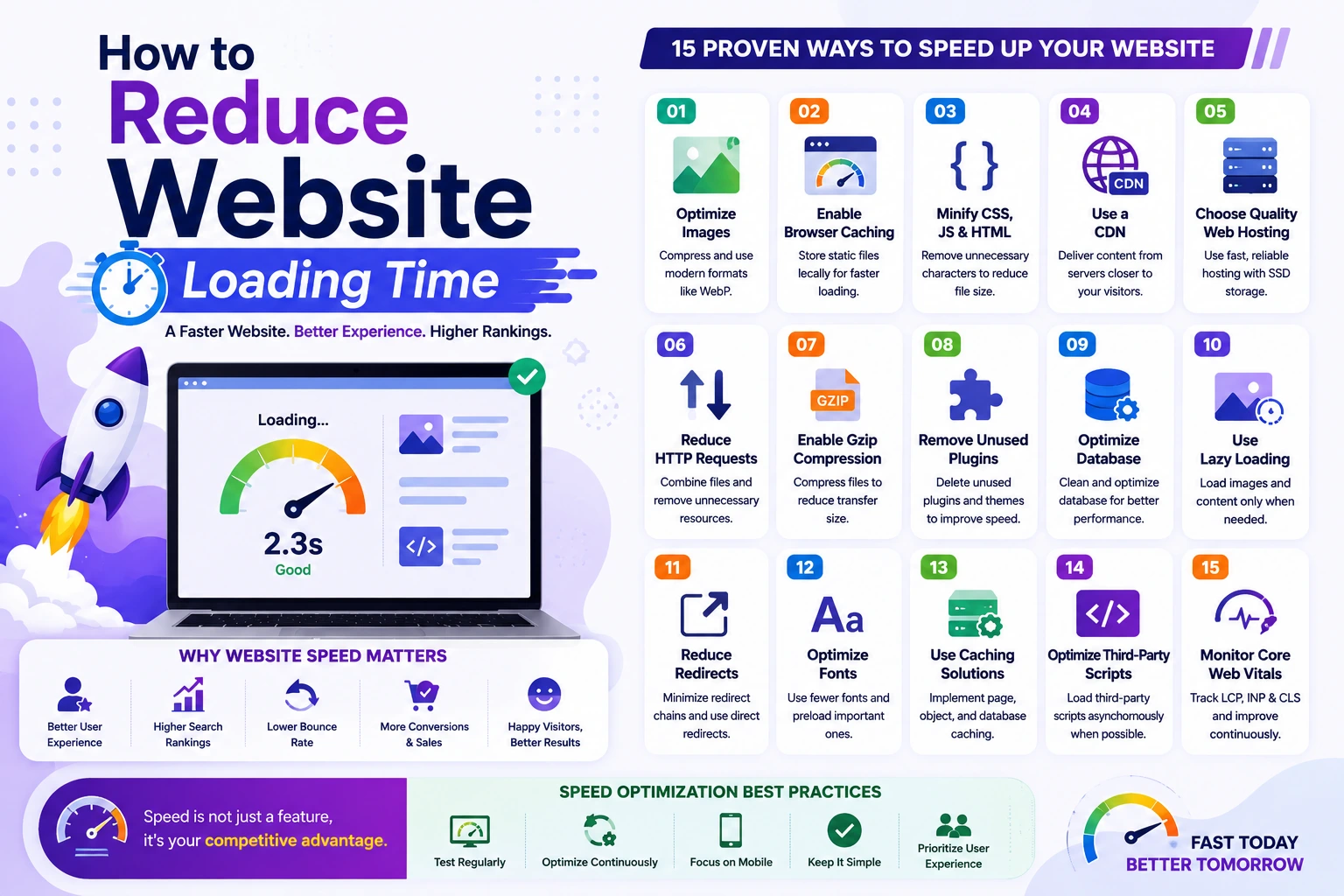
How to Reduce Website Loading Time
Website speed is one of the most important factors affecting user experience, search engine rankings, and conversion rates. Studies consistently show that visitors expect websites to load quickly, and even a few extra seconds of delay can lead to higher bounce rates and lost revenue.
Whether you run a blog, business website, e-commerce store, or web application, improving loading speed should be a top priority.
In this guide, you'll learn practical techniques to reduce website loading time and create a faster experience for your visitors.
Why Website Speed Matters
A fast website helps:
- Improve user experience
- Increase conversion rates
- Boost SEO rankings
- Reduce bounce rates
- Increase page views
- Improve customer satisfaction
A slow website can frustrate visitors and negatively impact business growth.
1. Optimize and Compress Images
Images are often the largest files on a webpage.
Uploading large, uncompressed images can dramatically slow down your website.
Best Practices
- Use modern formats like WebP
- Compress images before uploading
- Resize images to actual display dimensions
- Avoid uploading unnecessarily large files
Recommended Tools
- TinyPNG
- ImageOptim
- Squoosh
Benefit
Smaller image sizes reduce page load times significantly.
2. Enable Browser Caching
Browser caching allows visitors' browsers to store website resources locally.
When users return to your site, their browser can load cached files instead of downloading everything again.
Cached resources include:
- Images
- CSS files
- JavaScript files
- Fonts
Benefit
Faster loading for returning visitors and reduced server load.
3. Minify CSS, JavaScript, and HTML
Website files often contain unnecessary:
- Spaces
- Comments
- Line breaks
Minification removes these extra characters without affecting functionality.
Files to Minify
- CSS
- JavaScript
- HTML
Benefit
Smaller files download faster and improve page performance.
4. Use a Content Delivery Network (CDN)
A CDN stores copies of your website on servers around the world.
When a visitor accesses your website, content is delivered from the nearest server location.
Benefits
- Faster global performance
- Reduced server load
- Improved reliability
- Better user experience
A CDN is especially useful for websites with international visitors.
5. Choose Quality Web Hosting
Your hosting provider directly impacts website performance.
Low-quality hosting often results in:
- Slow response times
- Frequent downtime
- Resource limitations
Look for Hosting That Offers
- SSD or NVMe storage
- Good uptime
- Optimized servers
- Reliable support
Benefit
A fast hosting environment improves website speed before any additional optimization.
6. Reduce HTTP Requests
Every file loaded on a webpage creates an HTTP request.
Examples include:
- Images
- Scripts
- Stylesheets
- Fonts
The more requests your page makes, the longer it takes to load.
How to Reduce Requests
- Combine CSS files
- Combine JavaScript files
- Remove unnecessary plugins
- Limit external resources
Benefit
Fewer requests result in faster page rendering.
7. Enable Gzip or Brotli Compression
Compression reduces the size of files transferred between the server and visitors' browsers.
Common Compression Methods
- Gzip
- Brotli
These compress:
- HTML
- CSS
- JavaScript
Benefit
Smaller files load faster and consume less bandwidth.
8. Remove Unused Plugins and Extensions
Many websites accumulate plugins over time.
Unused plugins can:
- Slow down loading
- Increase server resource usage
- Create security risks
Best Practice
Regularly audit your plugins and remove those you no longer need.
Benefit
Cleaner websites generally perform better.
9. Optimize Database Performance
Database inefficiencies can significantly impact website speed.
Optimization Tips
- Remove unnecessary data
- Clean old revisions
- Optimize database tables
- Use proper indexing
For dynamic websites and web applications, database performance is critical.
Benefit
Faster database queries improve overall page speed.
10. Use Lazy Loading
Lazy loading delays loading certain resources until they are needed.
For example:
- Images below the fold
- Videos
- Embedded content
Instead of loading everything immediately, content loads as users scroll.
Benefit
Faster initial page rendering and improved user experience.
11. Reduce Redirects
Each redirect creates an additional request and response cycle.
Examples:
- HTTP → HTTPS redirects
- Multiple URL redirects
- Outdated page redirects
Best Practice
Minimize unnecessary redirect chains.
Benefit
Visitors reach the final page faster.
12. Optimize Fonts
Custom fonts can affect performance if not managed properly.
Recommendations
- Limit the number of font families
- Use modern font formats
- Preload important fonts
- Remove unused font weights
Benefit
Faster text rendering and reduced file size.
13. Use Caching Solutions
Caching stores generated content so the server doesn't have to recreate it for every visitor.
Common Types
- Page caching
- Object caching
- Database caching
Benefit
Reduced server workload and significantly faster loading times.
14. Optimize Third-Party Scripts
Many websites use external services such as:
- Analytics tools
- Advertising networks
- Chat widgets
- Social media embeds
While useful, these scripts can slow down your website.
Best Practice
Only use essential third-party services.
Benefit
Reduced loading overhead and improved performance.
15. Monitor Core Web Vitals
Core Web Vitals are important Google performance metrics.
Key metrics include:
Largest Contentful Paint (LCP)
Measures loading performance.
Interaction to Next Paint (INP)
Measures responsiveness.
Cumulative Layout Shift (CLS)
Measures visual stability.
Improving these metrics can positively impact user experience and search visibility.
Common Website Speed Mistakes
Uploading Large Images
One of the most common performance issues.
Installing Too Many Plugins
Adds unnecessary processing overhead.
Using Cheap Hosting
Can limit server resources and performance.
Ignoring Mobile Optimization
Mobile users often experience slower connections.
Not Using Caching
Misses one of the easiest performance improvements.
Website Speed Optimization Checklist
Before launching your website, ensure:
✅ Images are compressed
✅ Browser caching is enabled
✅ CSS and JavaScript are minified
✅ CDN is configured
✅ Gzip or Brotli compression is active
✅ Unused plugins are removed
✅ Database is optimized
✅ Lazy loading is enabled
✅ Core Web Vitals are monitored
✅ Hosting performance is sufficient
Final Thoughts
Reducing website loading time is not about one single optimization—it requires a combination of strategies working together. Faster websites improve user satisfaction, SEO rankings, and business results while providing a better overall experience for visitors.
Start by optimizing images, enabling caching, choosing reliable hosting, and reducing unnecessary resources. Even small improvements can lead to noticeable performance gains over time.
A fast website isn't just a technical advantage—it's a competitive advantage.